

Claude Desktop
Connect Anthropic's Claude Desktop to faz so the chat interface can query your databases through the safety pipeline.
Claude Desktop reads an MCP config at startup and spawns each registered server. Wiring faz takes one command and a Claude restart.
For the prerequisites and the conceptual "what's MCP" answer, see Integrations overview.
Prerequisites
- faz installed (
pip install faz-core— see Install). - A
faz.yamlwith at least one database connection and a permissions block. - Claude Desktop installed and signed in.
Command form: examples use faz <cmd>. If faz isn't on your PATH (common on Windows), run as python -m faz <cmd>. If you installed with uv pip install, run as uv run faz <cmd>. See Install for details.
Install the MCP config
faz mcp install --target claudeuv run faz mcp install --target claudepython -m faz mcp install --target claudeThis writes to:
- macOS:
~/Library/Application Support/Claude/claude_desktop_config.json - Linux:
~/.config/Claude/claude_desktop_config.json - Windows:
%APPDATA%\Claude\claude_desktop_config.json
Output:
[claude] /Users/you/Library/Application Support/Claude/claude_desktop_config.json: writtenTo preview without writing the file:
faz mcp install --target claude --dry-runuv run faz mcp install --target claude --dry-runpython -m faz mcp install --target claude --dry-runThe block faz adds looks like:
{
  "mcpServers": {
    "faz": {
      "command": "/usr/local/bin/faz",
      "args": ["mcp"],
      "env": {
        "FAZ_CONFIG": "/Users/you/projects/myapp/faz.yaml"
      }
    }
  }
}
command is the absolute path to the faz binary on your PATH at install time. FAZ_CONFIG is the absolute path of the faz.yaml you ran faz mcp install from. These need to be absolute because Claude Desktop spawns the subprocess with no working directory and a sanitised PATH.
If the file already had other MCP servers configured, faz preserves them and adds itself alongside.
Manual install via Settings
Prefer to edit the config by hand? Claude Desktop exposes the same file from its UI:
Settings → Developer → Local MCP servers → Edit Config
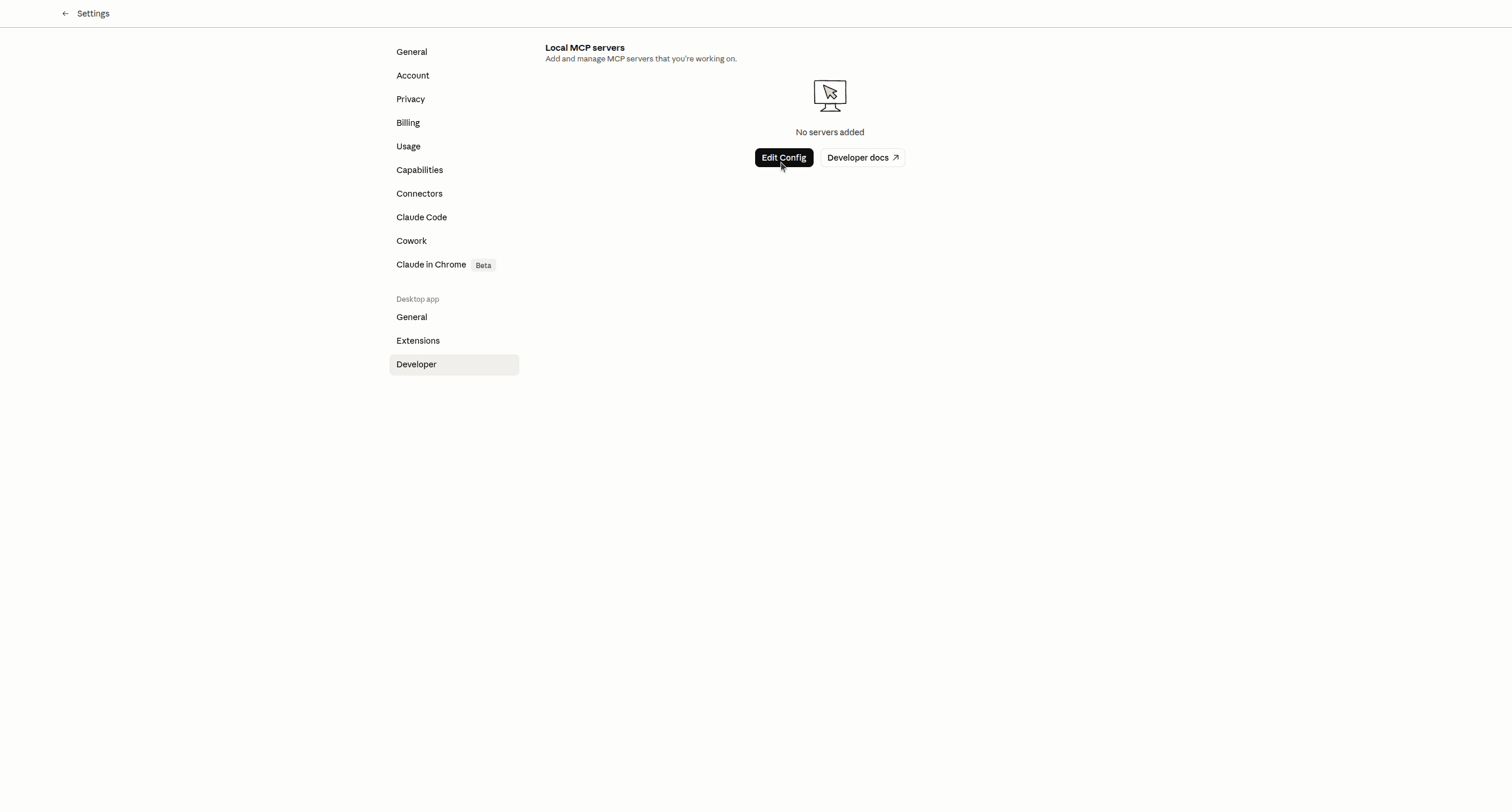
Edit Config opens claude_desktop_config.json in your default editor — the same file faz mcp install --target claude writes to. Paste the mcpServers.faz block shown above, save, and continue to the restart step. To preview the exact JSON faz would write for your machine (with absolute paths filled in), run:
faz mcp install --target claude --dry-runuv run faz mcp install --target claude --dry-runpython -m faz mcp install --target claude --dry-runThen copy the relevant block into the editor opened by Edit Config.
Restart Claude Desktop
Claude Desktop only re-reads its MCP config on startup. Quit Claude entirely (Cmd-Q on macOS, File → Quit on Linux/Windows — closing the window isn't enough) and relaunch.
Verify
Open a new chat and ask:
What databases do you have access to?
Claude calls list_databases and replies with the configured databases plus their tables. With one Postgres connector configured, you'll see something like:
I have access to one database,
<database>(postgresql), with 18 tables:<table-1>,<table-2>,<table-3>, …
Then ask something concrete:
How many rows are in the
<table>table?
Claude generates SELECT COUNT(*) FROM <table> and submits it through faz. The query runs through the safety pipeline (see How faz protects you), executes against Postgres, and the count comes back.
Common patterns
Once the wire-up works, the practical patterns are:
- Schema exploration: "What tables have a column called X?" — Claude calls
list_databasesto see schemas. - Quick aggregations: "What's the average order value last month?" — Claude writes the SQL and submits it.
- Cross-database joins: "Match rows from this Postgres table against documents in that MongoDB collection" — Claude builds a federated query (see Federated queries).
- Audit review: "Show me which queries got blocked yesterday" — Claude can't read the audit log directly through faz, but
faz logsfrom your terminal does.
Troubleshooting
If Claude doesn't see faz after restart, the most common causes are:
- The
commandpath is wrong. Open the config file and confirm the path tofazexists (which fazshould match). - You restarted the window, not the app. Cmd-Q (macOS) and reopen.
faz.yamldoesn't parse. Runfaz policyfrom the same directory you ranfaz mcp installto confirm.
Full diagnostic flow on MCP not loading.
Related
- Integrations overview — the cross-client comparison.
- Verifying the connection — diagnostic checks beyond "ask Claude".
- MCP tools — what Claude can call once connected.